How to Check Whether a Website Is Fake or Genuine
Learn how to check if a website is fake by verifying its URL, HTTPS security, contact details, online reviews, payment methods, and warning signs.

How to Check If a Website Is Fake: 10 Easy Ways to Identify Fake Websites and Stay Safe Online
The internet makes it easy to shop online, access information, book services, and connect with businesses. However, not every website is trustworthy. Some websites are created to steal money, collect personal information, or trick users into sharing passwords and banking details. Therefore, knowing how to check whether a website is fake or genuine is essential for anyone who uses the internet.
Fake websites can look professional and may even copy the design, logo, and product images of well-known brands. Fortunately, a few simple checks can help you identify suspicious websites before you make a payment or share sensitive information.
1. Check the Website URL Carefully
The first step is to examine the website address. Fake websites often use domain names that closely resemble genuine websites. Scammers may add extra letters, numbers, hyphens, or words to make a fraudulent URL appear authentic.
For example, a fake shopping website might use a domain that includes a brand name followed by words such as “sale,” “discount,” or “offers.”
Always check the spelling of the domain and make sure it matches the company’s official website. If you receive a website link through an unfamiliar email, text message, or social media account, avoid opening it until you have verified its authenticity.
2. Look for HTTPS and Website Security
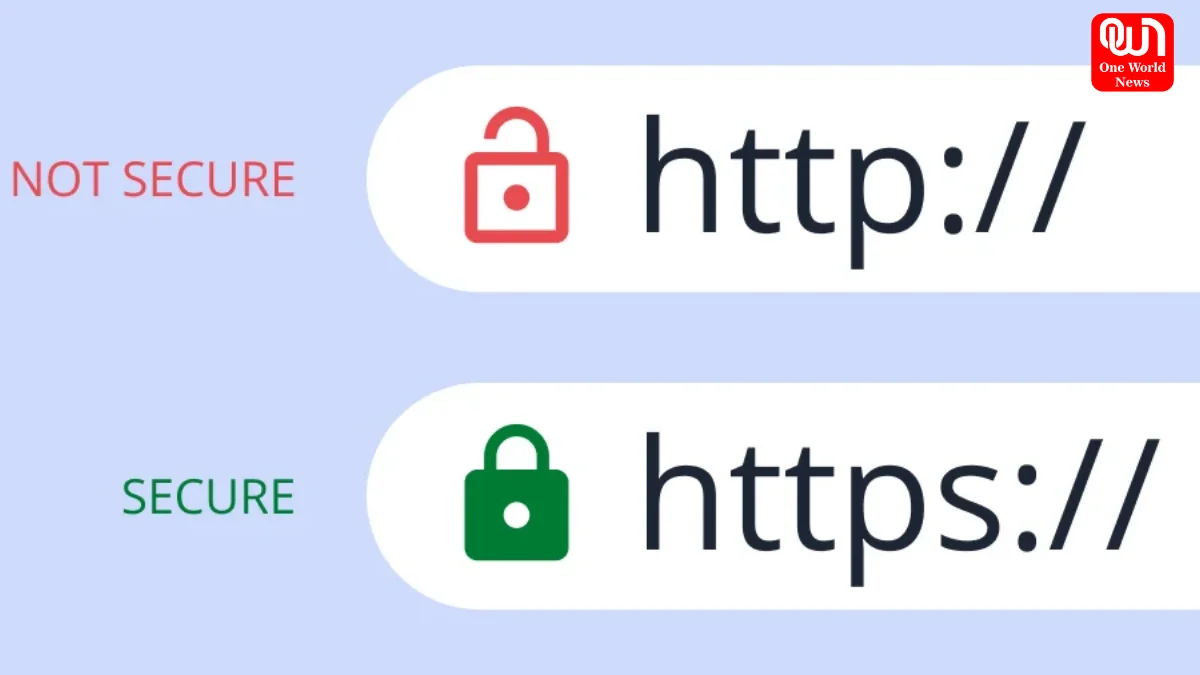
Another important step is checking whether the website uses HTTPS. A secure website address generally begins with HTTPS and displays a security indicator in the browser.
HTTPS encrypts information transferred between your browser and the website. This helps protect data such as login credentials and payment details during transmission.
However, HTTPS alone does not prove that a website is genuine. Fraudulent websites can also obtain security certificates. Always combine this check with other verification methods before trusting a website.
3. Verify Contact Information and Business Details
Genuine businesses generally provide clear information about their identity and how customers can contact them. Visit the website’s Contact Us, About Us, and company information pages.
Look for a valid business address, customer support email, telephone number, and other relevant business details. If the website claims to represent an established company, compare its information with the details available through the company’s official channels.
Be cautious if the website has no contact information, provides suspicious details, or uses an email address that does not match the business it claims to represent.
4. Read Independent Customer Reviews
Customer reviews can help you understand whether a website has a reliable reputation. Search for the website’s name along with terms such as “scam,” “fraud,” “fake website,” or “customer complaints.”
Check reviews on independent platforms rather than relying entirely on testimonials published on the website itself. Look for detailed feedback about product quality, delivery, refunds, and customer service.
Be careful if most reviews appear unusually similar, were published within a short period, or contain exaggerated praise without specific details. Remember that reviews can also be manipulated, so use them as one part of your overall assessment.
5. Be Careful With Unusually Low Prices
Extremely low prices are a common warning sign of online scams. Fraudulent stores may advertise expensive electronics, branded clothing, luxury accessories, or other popular products at prices that seem unrealistic.
These offers are often designed to create urgency and encourage customers to purchase without checking the seller.
Before placing an order, compare prices with established retailers and review the seller’s reputation. Genuine discounts are possible, but an offer that seems too good to be true deserves additional verification.
6. Check Payment Methods Before Purchasing
A trustworthy online store should explain its payment process clearly. Be cautious if a website demands payment through an irreversible bank transfer, cryptocurrency, gift cards, or an unfamiliar payment service.
Where available, choose a recognised payment provider or a payment method that offers suitable buyer protection. Review the payment terms before completing a transaction.
Never share your UPI PIN or one-time password (OTP) with someone claiming to process a refund or release a payment. You generally do not need to enter your UPI PIN to receive money.
7. Review the Website’s Policies
Before buying anything, read the website’s privacy policy, refund policy, shipping information, and terms and conditions.
These pages should explain how the business handles personal information, delivers products, processes returns, and resolves customer complaints.
Missing policies, vague refund conditions, contradictory information, or copied text containing another company’s name may indicate a suspicious website. However, the presence of these policies does not guarantee legitimacy.
8. Check the Domain’s Age and History
A website’s domain registration history can provide useful clues about its credibility. Recently registered domains deserve extra scrutiny when they claim to represent a business with many years of experience.
You can use a reputable domain lookup service to check when a domain was registered and whether its registration details are publicly available.
Keep in mind that new businesses can be legitimate, while older domains can also be compromised or misused. Domain age should support your investigation rather than determine your decision on its own.
9. Look for Poor Content and Suspicious Behaviour
Spelling mistakes, broken pages, inconsistent branding, low-quality images, and unusual pop-ups may indicate that a website is unreliable.
Also watch for pages that repeatedly redirect you, demand unnecessary personal information, or pressure you to act immediately.
Professional design does not guarantee safety, and genuine websites can occasionally contain mistakes. Focus on the overall pattern of warning signs rather than one isolated issue.
10. Use Website Reputation and Security Checks
You can investigate a suspicious website using reputable website reputation or security scanning services. These tools may identify reported scams, malicious content, or known security risks.
Search engines can also help you find warnings and complaints associated with a domain. For government services in India, verify that you are using the correct official domain rather than trusting a copied logo or page design.
read more: What Are Dopamine Sites? The New Digital Trend for the Thrill of Shopping Without Spending
Remember that automated scanners cannot detect every fraudulent website. A clean result should not replace manual verification.
Conclusion
Knowing how to check if a website is fake can help protect your money, personal information, and online accounts. Always verify the URL, examine security indicators, research independent reviews, confirm business details, and check payment policies before trusting an unfamiliar website.
If something appears suspicious, stop and investigate instead of rushing into a transaction. A few minutes of verification can help you avoid online scams and make safer decisions while browsing the internet.
We’re now on WhatsApp. Click to join.
Like this post?
Register at One World News to never miss out on videos, celeb interviews, and best reads.