Broken Android Phone? How to Recover Your Data in 2026
Smartphones have become an integral part of our digital lives. We usually save our important photos, videos, messages, documents, and other work-related information on our mobile phones.

Smartphones have become an integral part of our digital lives. We usually save our important photos, videos, messages, documents, and other work-related information on our mobile phones. Ever wondered what if your Android phone broke unexpectedly? Whether it’s due to a shattered screen, water damage, a dead battery, or a failed motherboard, the risk of losing your valuable data can be incredibly stressful.
In 2026, several Android data recovery methods and third-party tools are available that you can try to recover your lost data from a broken Android phone. This guide walks you through everything you need to know about recovering data from a broken Android phone, from simple cloud restores to advanced professional methods. Let’s check these methods in detail!
Understanding Why Android Phones Break
Before diving into recovery methods to restore data from your broken Android phone, it’s important to identify the type of damage, as recovery options depend heavily on the phone’s condition. Some common reasons why your phone gets damaged are:
- Physical Damage: Your phone might be physically damaged with cracked screens, broken displays, damaged touch panels, etc. In all these cases, it won’t start, and you may lose the stored content.
- Water or Liquid Damage: Spills, rain, or submersion can damage internal components, while the data stored in memory may still be intact.
- Software or System Failure: Boot loops, stuck logos, failed updates, or corrupted operating systems can make the phone unusable without deleting data.
- Overheating: Prolonged gaming, heavy app usage, or charging issues can overheat the phone and damage internal hardware.
- Manufacturing Defects or Ageing Hardware: Over time, internal components wear out, and hidden manufacturing defects may surface after extended use.
Immediate Steps After Your Android Phone Breaks
When you find your Android phone is broken, it’s important to consider the following immediate actions to enjoy successful data recovery:
- Avoid frequent factory resets, especially if your data isn’t properly backed up.
- Avoid using random repair apps, as they can overwrite important data.
- Ensure your device is properly synced to cloud backup services, such as Google Drive or OneDrive.
- Remove the SIM and SD card safely.
How do I Recover Data Lost from Broken Android Phone? [Quick Methods]
Whether you have a backup of data lost from a broken Android phone or not, data recovery is possible in all scenarios. Here are some quick and effective Android data recovery methods that you can try to get your lost data back:
Method 01: Recover Data Using Google Drive Backup
If you’ve synced your Android device with Google Drive backup, much of your data may already be safe. It automatically creates a backup of photos, videos, documents, and other types of files saved on your Android phone, which you can restore when data loss happens. All you have to do is:
- Launch the Google Drive app on your PC or visit the Google Drive web page.
- Sign in using the Google account that you’ve used for backup.
- Tap the My Drive tab on the left, press Type, and select the type of data you need to restore.
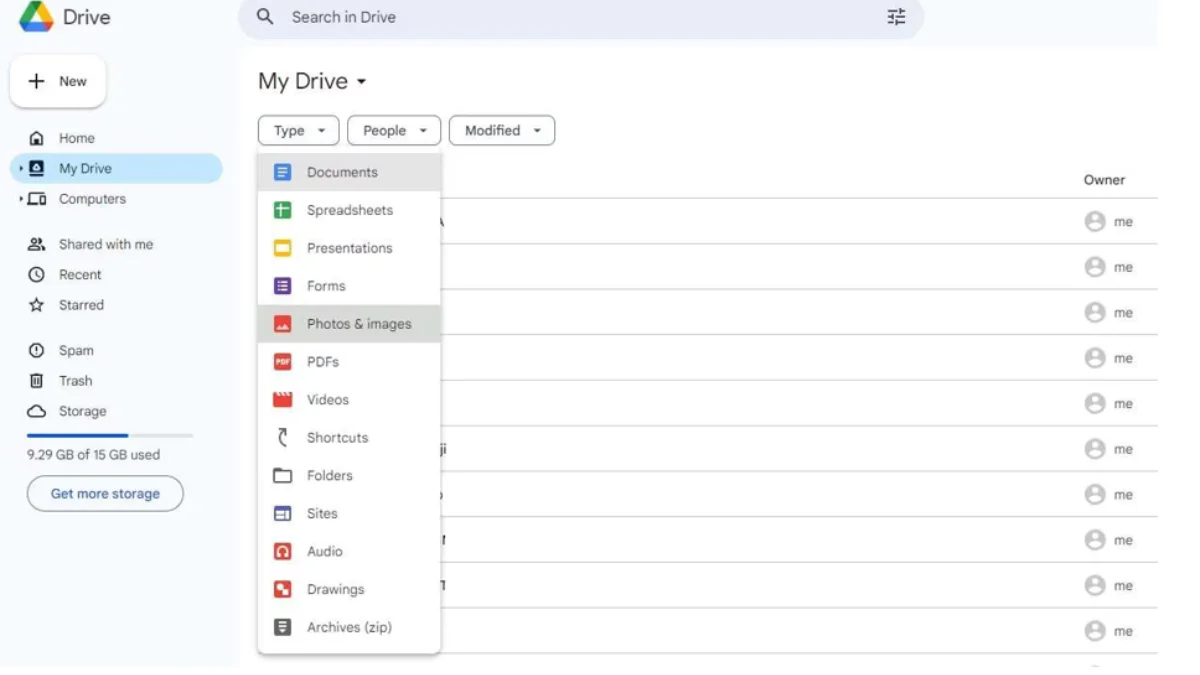
- Lastly, click the three-dot icon at the top and hit Download to save them to your PC.
Read More: Apple iPhone Fold: Launch Date, Specifications, Design, Cameras and More
Method 02: Use Android Data Recovery Software
What if you don’t have a backup of your lost data? Don’t worry, data recovery is possible even without any backup! In such cases, you need third-party Android data recovery software tools like Stellar Data Recovery for Android to restore your lost data. This all-in-one data recovery tool performs a thorough scanning of your Android phones to retrieve lost or inaccessible data, even from damaged devices.
Stellar Data Recovery for Android software supports a wide range of Android brands and versions and is designed to recover data without overwriting existing files. You can use this tool to restore lost data of various file types, including photos, videos, documents, SMS and call logs, WhatsApp data, and more. The software offers a user-friendly interface suitable for beginners and non-technical users. These features make it a practical option for recovering data from phones with screen or system issues.
Here’s how to recover data lost from a broken Android phone using this Android data recovery software:
Step 1: Download and install Stellar Data Recovery for Android on your computer. Also, connect your Android phone to that computer.
Step 2: Launch the software and from the home screen, choose “Recover Android Data” and then select the type of file you need to restore from a broken or crashed Android phone. Click Next.
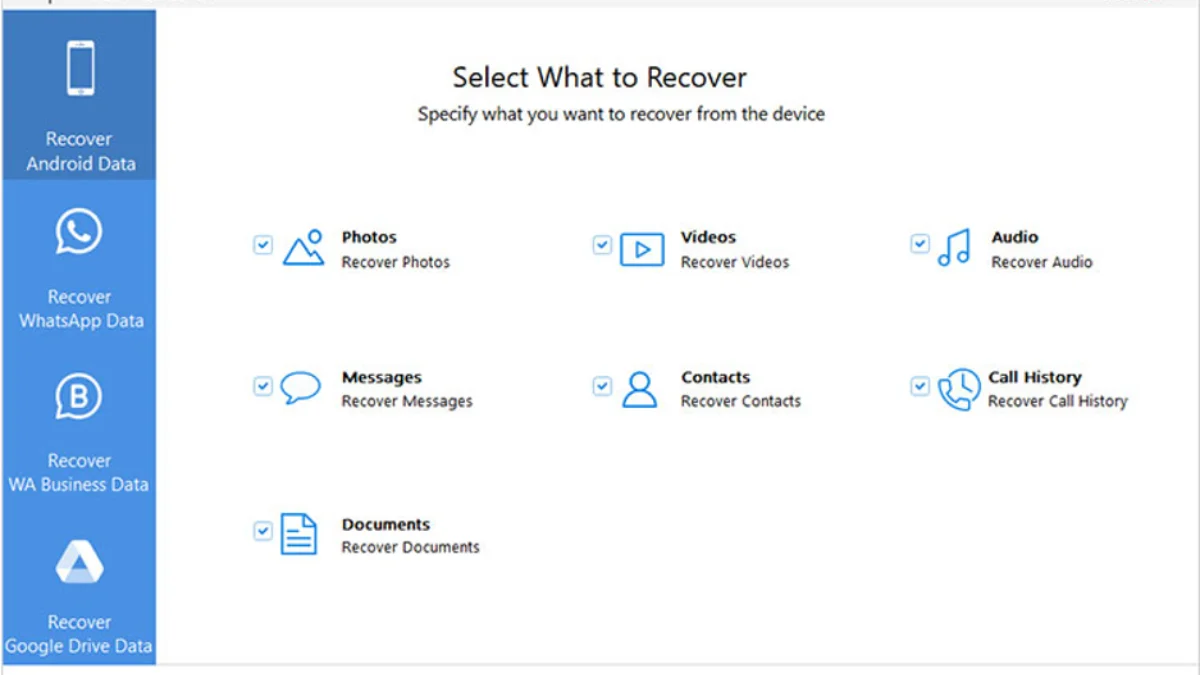
Step 3: Click Scan and wait till the scanning process completes. This process may take some time, depending on the data size and phone condition.

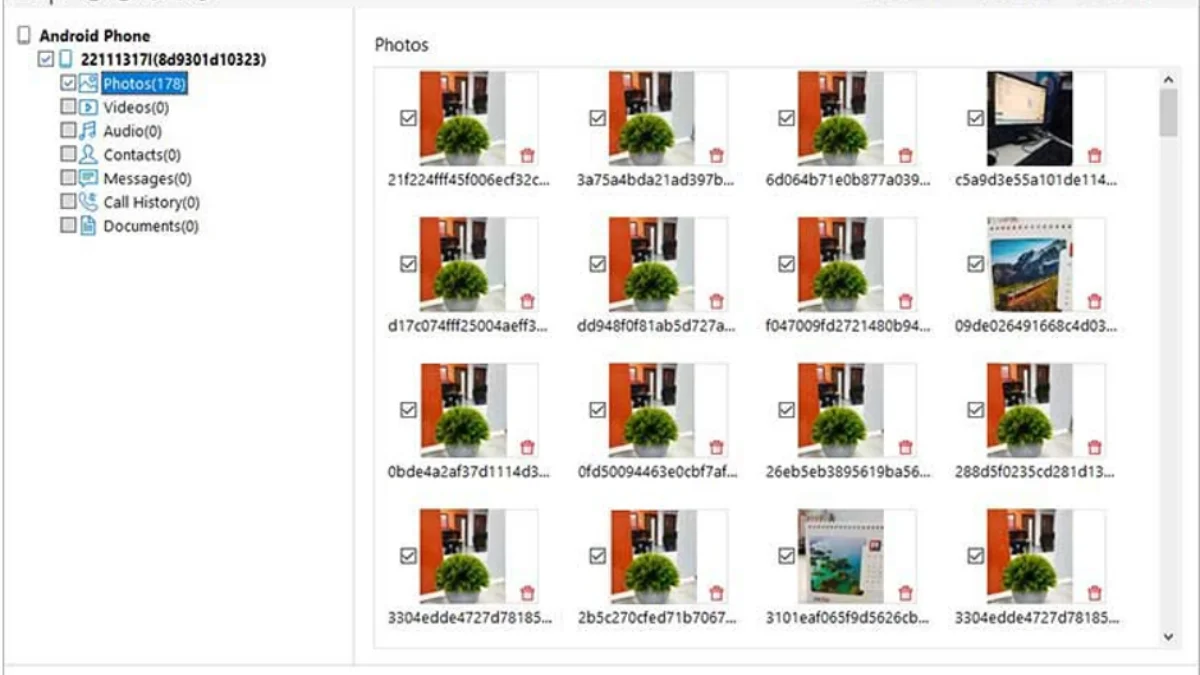
Step 4: After scanning, the software displays a list of recoverable files. Preview recoverable photos, messages, and contacts and select all that you want to recover. Click Save to save the recovered data to your computer.
Note: Avoid saving recoverable files to your Android phone to prevent overwriting existing data and reducing recovery success.
Final Thoughts
Recovering data from a broken Android phone can be challenging, especially if you don’t have any adequate backup. Fortunately, in 2026, multiple recovery options exist—ranging from simple Google backups to advanced third-party Android data recovery software. The success of data recovery depends on factors like phone condition, backup availability, and encryption settings.
The key takeaway is act quickly, avoid risky actions, and choose the right recovery method. With proper preventive steps such as regular backups and cloud synchronisation, data loss can often be avoided altogether.
Frequently Asked Questions (FAQs)
Is it possible to recover data from a completely broken Android phone in 2026?
Yes, in many cases, you can recover data from a completely broken Android phone in 2026 using Google Cloud Backups, Android data recovery software, or professional data recovery services. These methods will help even if the phone does not turn on.
What type of data can be recovered from a broken Android phone?
You can usually restore deleted photos, videos, contacts, messages, call logs, documents, and app data, depending on the phone’s condition, backup availability, and encryption settings.
Can data be recovered after a factory reset?
Data recovery after a factory reset is very difficult due to Android encryption. Only cloud backups or third-party tools like Stellar Data Recovery for Android can reliably restore data.
We’re now on WhatsApp. Click to join.
Like this post?
Register at One World News to never miss out on videos, celeb interviews, and best reads.